
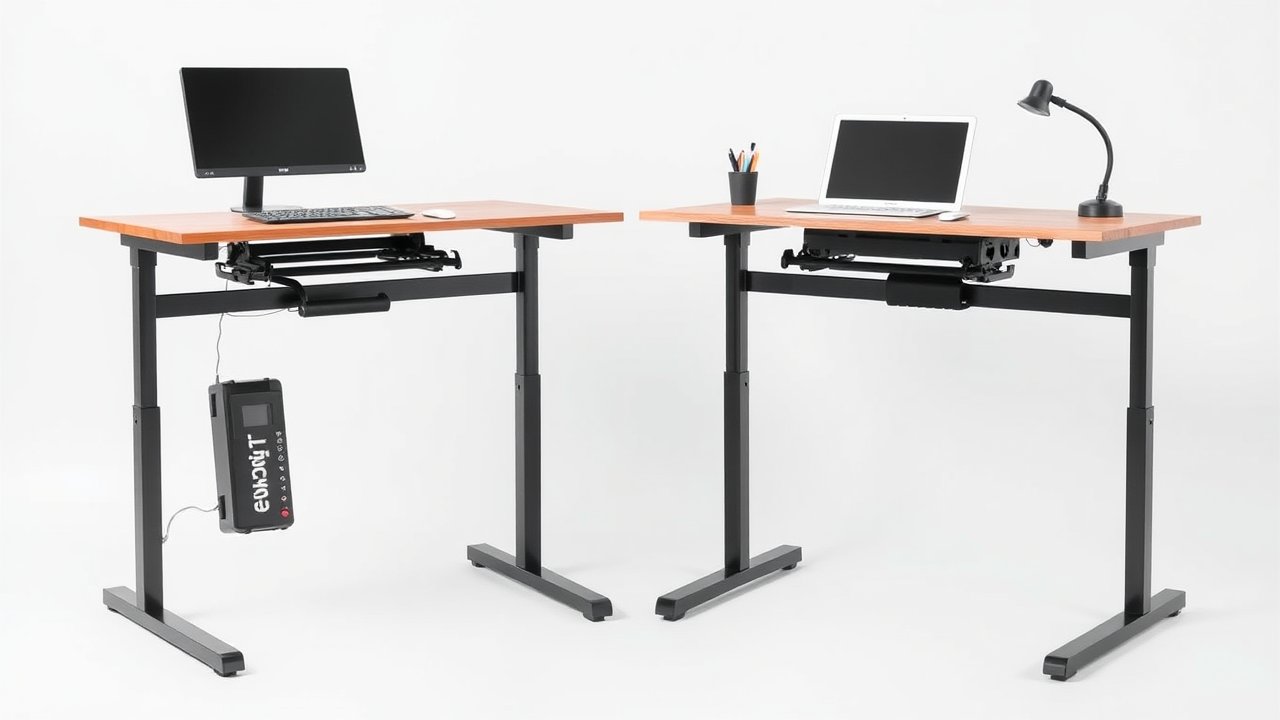
If you’re shopping for a sit-stand desk, one of the first decisions you’ll face is the electric vs manual standing desk question. Manual desks – usually adjusted with a hand crank – cost less and never need a power outlet. Electric desks raise and lower at the push of a button and often include memory presets. On paper, the manual desk seems like the smarter budget move. In practice, the way you’ll actually use your desk matters far more than the sticker price. This comparison is for anyone buying their first standing desk who wants to avoid the most common regret: buying a desk that ends up permanently stuck at one height.
As an Amazon Associate, I earn from qualifying purchases. This article contains affiliate links at no extra cost to you.
Quick Verdict
For most people, an electric standing desk is the better buy because it makes switching between sitting and standing effortless – and that’s what determines whether you’ll actually use the feature. A manual crank desk only makes sense if you rarely change heights, have no power outlet nearby, or are on a very strict budget.
Side-by-Side Comparison
| Feature | Electric Standing Desk | Manual (Crank) Standing Desk |
|---|---|---|
| Typical Price | $200–$800+ | $150–$400 |
| Adjustment Time (sit to stand) | ~10–20 seconds, hands-free | ~30–60 seconds of cranking |
| Effort | Push a button | Physical cranking |
| Memory Presets | Common | None |
| Weight Capacity | 150–350+ lbs | 100–220 lbs typical |
| Power Needed | Yes | No |
| Noise | Low motor hum | Silent (crank noise only) |
| Moving Parts to Fail | Motor, control box, keypad | Crank gears |
| Typical Warranty | 3–15 years (frame/motor) | 1–5 years |
Prices are approximate at the time of writing and may vary. Check Amazon for the current price.
Electric Standing Desk – In-Depth Review
Design & Build Quality
Electric standing desks use one or two motors inside the legs to raise and lower the desktop. Budget models typically use a single motor and two-stage legs, while mid-range and premium desks use dual motors and three-stage legs for faster movement and a wider height range. Popular options like the FlexiSpot E7 and Uplift V2 use steel frames, crossbars, and stable feet that keep wobble low.
Performance & Stability
Dual-motor electric desks typically move at about 1.5 inches per second, which means switching from sitting to standing takes roughly 10 to 20 seconds. Stability depends mostly on the frame design and leg stages, not on whether it’s electric. Well-built electric desks are very stable at standing height, especially with a crossbar.
Features & Customization
The big advantage is the keypad. Memory presets let you save your sitting and standing heights, so one button press takes you to the right position every time. Many desks include collision detection, child locks, and USB ports. Some even offer app control or reminders to stand.
Price & Value
Electric desks start around $200 for single-motor models and climb past $800 for premium dual-motor desks with solid wood tops. Our list of the best standing desks under $300 covers solid electric options that cost only slightly more than good manual desks.
Best for: Anyone who plans to switch between sitting and standing several times a day, people who share a desk, and anyone with heavy equipment like multiple monitors.
Check Electric Desks on Amazon →
Manual (Crank) Standing Desk – In-Depth Review
Design & Build Quality
Manual desks use a hand crank connected to gears inside the legs. You turn the crank to raise or lower the surface. The mechanism is simple, which keeps costs down and means there’s no motor, control box, or wiring to fail. Build quality varies a lot – good crank desks have steel frames and smooth gears, while cheap ones can feel loose.
Performance & Stability
Cranking a desk from sitting to standing height takes 30 to 60 turns and about half a minute to a minute of effort. With a laptop and a single monitor, it’s manageable. With two monitors and a heavy desktop, cranking becomes a real workout – and that’s where many owners stop adjusting altogether. Stability is similar to electric desks of the same frame quality.
Features & Customization
Manual desks don’t have presets, so you need to find your preferred heights each time. Some come with a height scale on the leg to help. They don’t need electricity, which makes them handy in rooms without outlets or in shared spaces where cables would be a hazard.
Price & Value
Manual desks usually cost $50 to $150 less than comparable electric models. That’s meaningful on a tight budget, but the gap has narrowed as entry-level electric desks have become cheaper.
Best for: People who change height only once or twice a day, rooms without convenient outlets, kids’ desks, and very tight budgets.
Check Manual Desks on Amazon →
Electric vs Manual Standing Desk: Key Differences
Price Difference
Manual desks are cheaper, but often by less than people expect. A decent crank desk costs $150 to $300, while reliable single-motor electric desks start around $200 to $250. When you consider that the whole point of a standing desk is changing positions, the extra $50 to $100 for an electric model is usually money well spent.
Performance Difference
The real difference is friction. Research on sit-stand desks consistently finds that the benefits come from changing posture regularly, not from standing all day. If raising the desk takes a minute of cranking, you’ll do it less often. Electric desks remove that barrier entirely. They also handle heavier loads, which matters if you’re running a dual-monitor standing desk setup.
Durability is a wash. Electric desks have more parts that can fail, but quality brands back motors with warranties of five years or more. Manual cranks are simple but can wear or strip under heavy loads.
Who Should Buy an Electric Standing Desk
- You want to switch between sitting and standing multiple times a day
- You have more than 50 pounds of equipment on your desk
- Several people share the desk and need different heights
- You care about convenience features like presets and collision detection
Who Should Buy a Manual Standing Desk
- You’ll mainly use one height and adjust rarely
- There’s no power outlet near your workspace
- You need the absolute lowest price
- The desk is for a kid’s room and you want no motor or electronics
Noise, Speed, and Daily Use
Noise is rarely a deal-breaker either way. Electric desks produce a soft motor hum for 10 to 20 seconds while they move – quieter than most office chairs creaking. Dual-motor desks are usually quieter than single-motor ones because each motor works less hard. Manual desks are silent apart from the crank mechanism.
Speed matters more than people expect. Imagine you’re on a video call and want to stand up to re-energize. With an electric desk, you press a preset button and keep talking. With a crank desk, you’re bending over turning a handle for half a minute while your colleagues watch. Small frictions like this add up over months.
Stability and Weight Capacity
Stability depends mostly on frame design – leg stages, crossbars, foot length, and desktop thickness – rather than the lifting mechanism. That said, electric desks generally offer higher weight capacities because motors can lift loads that would be exhausting to crank. If you plan to put two or three monitors, a desktop PC, speakers, and a monitor arm on your desk, you could easily exceed 100 pounds. At that point, manual cranking becomes impractical.
Maintenance and Repairs
Manual desks need very little maintenance: occasionally tighten the bolts and keep the crank mechanism clean. Electric desks also need bolt checks, plus the occasional reset if the control box loses its calibration (usually a simple button sequence in the manual). If a motor or control box fails, most reputable brands ship replacement parts under warranty, and swapping them typically takes 15 to 30 minutes with basic tools. Before you buy any electric desk, check the motor and electronics warranty specifically – not just the frame warranty.
Real-World Cost Over Five Years
Let’s compare a typical scenario. A good manual crank desk costs about $250. A comparable single-motor electric desk costs about $300, and a dual-motor desk around $450. Electricity costs for an electric desk are negligible – a few dollars over five years.
Spread over five years of daily use (roughly 1,250 workdays), the price difference between a manual desk and a single-motor electric desk works out to about four cents per workday. If the electric desk leads you to stand for even 30 extra minutes a day, that’s one of the cheapest health upgrades you can make. For a deeper look at the research, read our article on standing desk benefits.
What About Standing Desk Converters?
If you’re torn between electric and manual because of budget, there’s a third option: a desktop converter that sits on top of your existing desk. Converters range from about $100 to $400, use gas springs or manual lifts, and require no assembly beyond placing them on your desk. They’re great for renters and anyone with a desk they love. The downsides are less workspace, a higher keyboard position that isn’t always ergonomic, and limited monitor weight. See our guide to the best standing desk converters if this sounds like a fit.
Our Recommendation
Winner: Electric standing desk. For the vast majority of home office workers, an electric desk is worth the modest extra cost because it makes height changes effortless – and effortless means you’ll actually do it. A dual-motor model is ideal if your budget allows, but even a single-motor desk is a big step up from cranking.
Runner-up: Manual crank desk – a solid choice if you’re on a strict budget, don’t have convenient power, or will rarely adjust height.
Whichever you choose, pair your desk with a good anti-fatigue mat and a supportive chair. Our guide on how to set up a standing desk correctly walks you through ideal heights and posture. For research on why movement matters, see the Cleveland Clinic’s overview of standing desks.
FAQ
Are manual standing desks worth it?
They can be if you adjust height infrequently or need a desk without electricity. But many owners end up leaving manual desks at one height because cranking is tedious. If you plan to switch positions often, an electric desk is a better long-term investment.
How long do electric standing desk motors last?
Quality motors are typically rated for many thousands of cycles and are often covered by warranties of five years or more. With normal use – a few adjustments per day within the weight limit – a good electric desk should last many years.
Do electric standing desks use a lot of electricity?
No. The motor only runs while the desk is moving, and standby power is minimal. Annual electricity cost is usually just a few dollars or less.
Is a single-motor electric desk good enough?
For lighter loads (under about 150 pounds) and a single user, yes. Dual-motor desks are faster, quieter, more stable, and handle heavier setups, so they’re worth it for multi-monitor workstations.
Are electric standing desks safe around kids and pets?
Most modern electric desks include anti-collision sensors that stop and reverse the desk if it hits an obstacle, and many keypads have a child lock. Still, it’s smart to keep cables tidy and make sure nothing is under the desk before lowering it. Manual desks have no motor, so there’s less risk of an unexpected movement.
Which is better for a small apartment?
Both work in small spaces, but electric desks are easier to live with because you can quickly drop them to sitting height or raise them out of the way. Compact electric models with 40 to 48-inch tops are widely available – see our guide to the best standing desks for small spaces.
Can I convert a manual standing desk to electric?
Usually not practically. The leg mechanisms are different. It’s more cost-effective to sell the manual desk and buy an electric frame.
Final Thoughts
In the electric vs manual standing desk debate, convenience wins. An electric desk costs a little more but turns sit-stand switching into a habit instead of a chore. Choose a manual desk only if your use case truly calls for it.